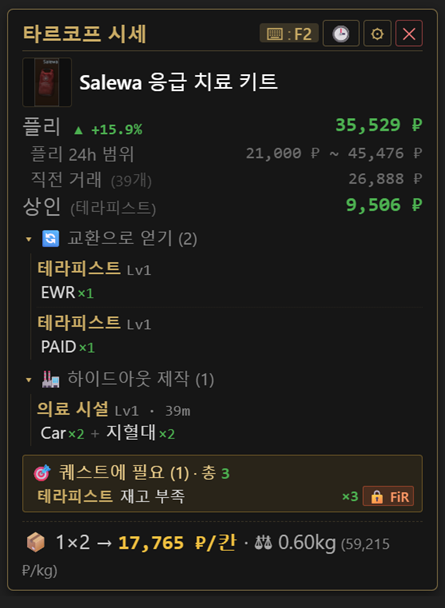
Hover an item and press F2 — flea market prices, trader prices, barters, hideout crafts, and quest requirements appear as a transparent card in about a second. No more alt-tabbing to a wiki.
🛡️ It uses none of the actions that get you banned
— built to carry no ban risk
It is a completely different category from memory hacks, ESP, or aimbots, and no bans have been reported for OCR-based overlays like this to date. That said, it is not officially sanctioned by BSG, so 100% can't be guaranteed and use is at your own risk. The code is 100% open on GitHub for anyone to inspect.
Decide instantly whether loot is worth selling or keeping
Current price · 24h range · last trade · per-slot price (₽/slot), all auto-calculated.
Best-price trader · buy-from vendors · required trader level at a glance.
Barters that produce this item and barters that consume it. Quest-locked barters get a 🔒 badge.
Craft recipes, plus which station Lv N upgrade needs this item and how many.
Reads your EFT log to detect your own progress — done / in-progress / not-started by color.
On weapon/ammo capture, compares the whole caliber by penetration & damage in one table.
Auto S/A/B/C/D grade from ₽/slot weighted by Kappa & quest needs.
₽/kg carry value, prices split by game mode, instant Korean/English switch.
Banner when a new version is out → one-click install. Keeps your last 15 lookups.
Hover an inventory item, press F2 → about a second
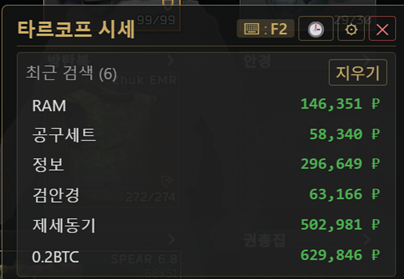 History (last 15)
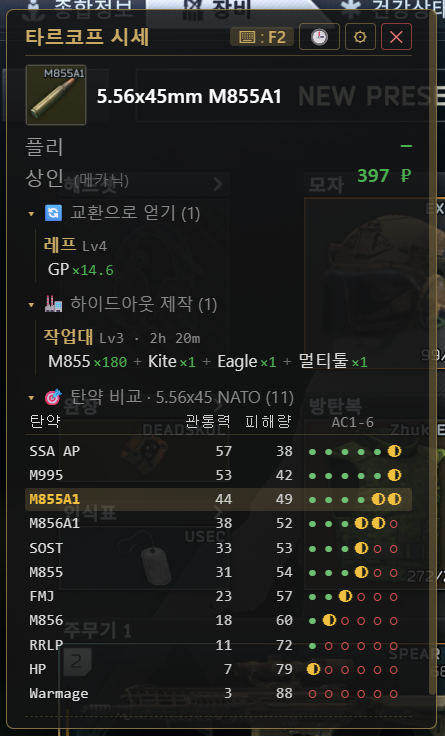 Ammo comparison matrix
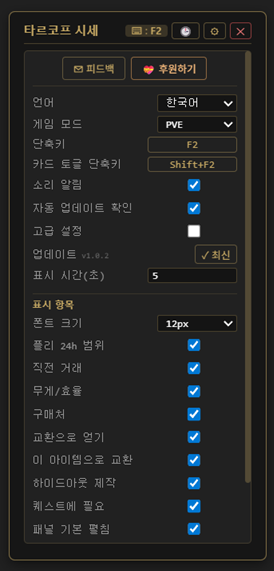 Detailed settings
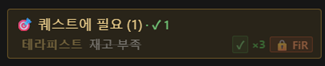 Quest tracker
Installer or portable ZIP from Releases. First launch downloads the OCR model once (1–5 min).
Tarkov runs elevated, so run the overlay as admin too — otherwise the hotkey won't reach the game.
Make the item name visible, press F2. Drag any blank area of the card to move it (auto-saved).
Screen capture + OCR only — the same category as YouTube recorders or Discord screen share
Real comments from the Korean Tarkov community threads - follow the links to read the originals
Map-reading tools felt too much like cheating to me, but this one looks fine.
Studycafe · 2026-05-10If this had existed when I started Tarkov... upvoted.
Anonymous · 2026-05-10It's a beefed-up item scanner. Definitely helps a lot when you're new.
Anonymous · 2026-05-13The functionality on this is ridiculous.
City · 2026-05-13The features are insane. Using it constantly, thank you!
Anonymous · 2026-05-19Clean UI, it builds whatever you ask for, and the feedback turnaround is fast.
Anonymous · 2026-05-15Translated from Korean. Originals: DCInside Tarkov gallery v1.0.4 thread and v1.0.7 thread (the forum has no star-rating system).
Yes, completely free and MIT open-source. You can review the full code on GitHub and build it yourself.
Flea market current price, 24h range, last trade, price per slot, the best trader to sell to and where to buy, barters in both directions, hideout crafts and upgrade requirements, which quests need the item plus your own progress, an ammo comparison table for the same caliber, weight efficiency (RUB/kg) and a loot tier - all on one card. Every row can be toggled on or off in Settings.
It uses screen capture and OCR only; it doesn't read game memory or inject. It's a fundamentally different category from memory hacks and ESP. BSG hasn't officially sanctioned it, so use is at your own risk — and no bans have been reported for similar OCR-based overlays to date.
The usual cause is the capture box missing the item name. Open Settings -> Capture region: a box follows your cursor, so nudge the X/Y offsets until the item's name sits inside it. On QHD/4K just press "Auto-scale for resolution". If one specific item is always misread, save a misread -> correct-name mapping in Settings and it will be fixed automatically from then on.
Tarkov runs as administrator, so right-click the app → "Run as administrator" for the hotkey to reach the game. Also switch the game's graphics to "Borderless Fullscreen" (exclusive fullscreen blocks every overlay at the OS level). If it still fails, rebind the hotkey in Settings.
The executable is unsigned for cost reasons, not malware. Click "More info → Run anyway". The behavior and full source are open on GitHub.
Per-monitor DPI is handled. If it's still off, fine-tune the capture X/Y offset in Settings, or hit "Auto-fit resolution".
Switch Game mode to PVE in Settings. PVP and PVE price data are stored separately.
The app checks for a new version on launch and shows a notice on the card when one exists; click "Install now" and it downloads and installs itself. You can also run the latest installer from GitHub Releases over the top, or turn the automatic check off in Settings.
From tarkov.dev, a community-run public API. No game memory and no account data are used. If that source has an outage, the app automatically switches to a backup source so lookups keep working.
The only official download is the GitHub Releases page below
If Windows SmartScreen warns on install, click "More info → Run anyway". Price data comes from the tarkov.dev community API.
💛 Supporters
Your support keeps this free project going. Thank you!
 Tarkov Price Overlay