Price check
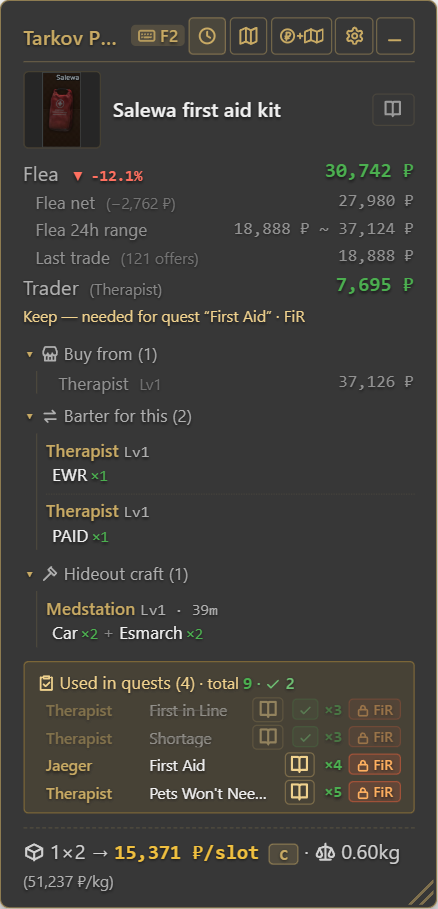
Hover an item and press F2 — the card appears in about a second.
- Flea and trader prices, price per slot
- Barters, crafts, hideout and quest needs
- Ammo comparison and loot tier
Press F2 for flea and trader prices, your screenshot key to find yourself on the map, and share one party code to see your friends. No more alt-tabbing to a wiki.
Based on anonymous in-app usage stats · Nov 2026
🛡️ It uses none of the actions that get you banned
— built to carry no ban risk
It is a completely different category from memory hacks, ESP, or aimbots, and no bans have been reported for OCR-based overlays like this to date. That said, it is not officially sanctioned by BSG, so 100% can't be guaranteed and use is at your own risk. The code is 100% open on GitHub for anyone to inspect.
The three things you need mid-raid, without leaving the game

Hover an item and press F2 — the card appears in about a second.
MePress the game's screenshot key in raid to see where you are and which way you face.
MeFriend AFriend BExample of friends on the map (illustration)Create a party room and send your friends the 6-character code.
🛡️ Enemies and other players are never shown. The map only shows you and friends in your party room, and the app never reads game memory.
Decide instantly whether loot is worth selling or keeping
Current price · 24h range · last trade · per-slot price (₽/slot), all auto-calculated.
Best-price trader · buy-from vendors · required trader level at a glance.
Barters that produce this item and barters that consume it. Quest-locked barters get a 🔒 badge.
Craft recipes, plus which station Lv N upgrade needs this item and how many.
Reads your EFT log to detect your own progress — done / in-progress / not-started by color.
On weapon/ammo capture, compares the whole caliber by penetration & damage in one table.
Auto S/A/B/C/D grade from ₽/slot weighted by Kappa & quest needs.
₽/kg carry value, prices split by game mode, instant Korean/English switch.
Banner when a new version is out → one-click install. Keeps your last 15 lookups.
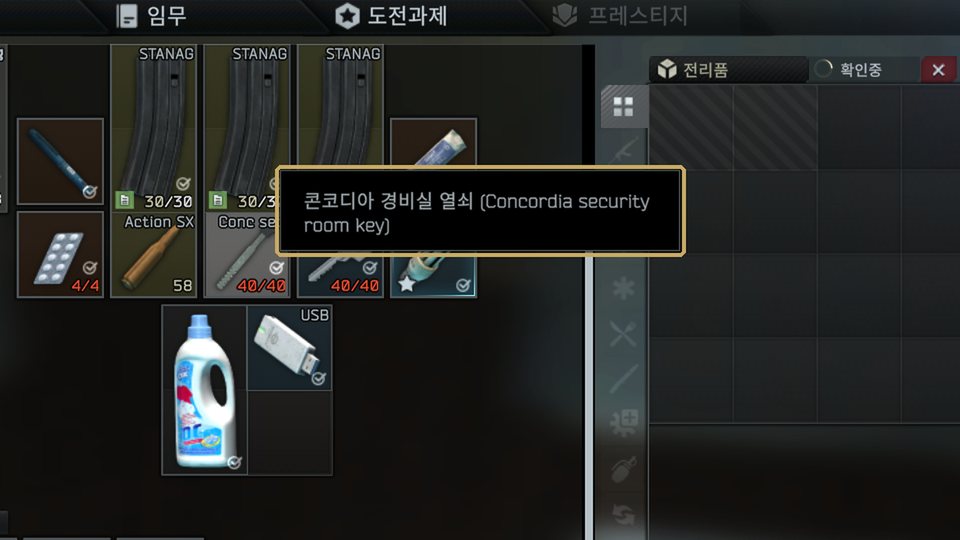
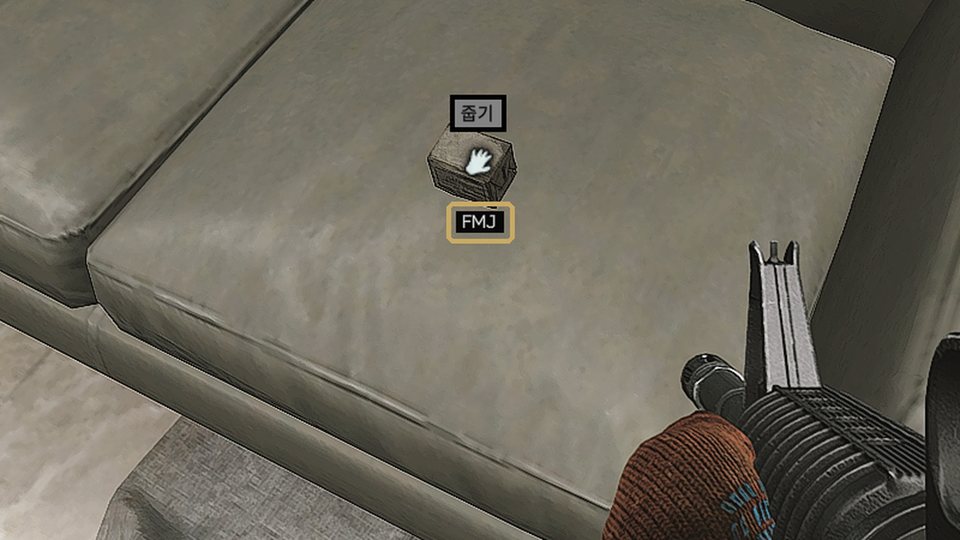
Inventory: after the name tooltip appears. Loose loot in raid: right away.
Inventory: press F2 once the name tooltip shows
Raid floor: press F2 as soon as the label showsInventory: wait for the name tooltip, then F2. Raid floor: F2 right away → about a second
History (last 15)
Ammo comparison matrix
Detailed settings
Quest tracker
Map (quest & story objectives, automatic)
Side-by-side map mode (second monitor)Installer or portable ZIP from Releases. First launch downloads the OCR model once (1–5 min).
Tarkov runs elevated, so run the overlay as admin too — otherwise the hotkey won't reach the game.
Inventory: hover an item and press F2 once its name tooltip appears. Raid floor: press F2 as soon as you look at the item. Drag any blank area of the card to move it (auto-saved).
Screen capture + OCR only — the same category as YouTube recorders or Discord screen share
Real comments from the Korean Tarkov community threads - follow the links to read the originals
Insane update lol. I still use it all the time to check prices or whether an item is needed for a quest. So handy. Upvoted.
Anonymous · 2026-11-04The price check is genuinely useful. I am new, so I had no idea what anything was worth and just grabbed whatever.
Anonymous · 2026-11-04The quest tracker is insane.
BlackHunter · 2026-11-04A third-party tool like this for Tarkov newbies. Thank you.
Anonymous · 2026-11-04Been using this a lot since Blitz got blocked.
tag_tomboy · 2026-11-04I have been using that Tarkov Helper thing, but this one is good too.
Sogani · 2026-11-04Translated from Korean. Originals: DCInside Tarkov gallery v1.2.6 thread (comments above, Nov 2026). Also posted on Arca.live. The counts also include the earlier v1.0.4 and v1.0.7 threads (the forum has no star-rating system).
Yes, it's MIT open-source. You can review the full code on GitHub and build it yourself.
Flea market current price, 24h range, last trade, price per slot, the best trader to sell to and where to buy, barters in both directions, hideout crafts and upgrade requirements, which quests need the item plus your own progress, an ammo comparison table for the same caliber, weight efficiency (RUB/kg) and a loot tier - all on one card. Every row can be toggled on or off in Settings.
It does not read game memory. When you press the game's screenshot key in raid, the game saves a screenshot whose file name contains your coordinates. The app uses those coordinates and the game log to show your position and map. Your position only updates when you take a screenshot.
Open Party in the map panel, create a room and send the 6-character code; up to 5 players can join. It is not live tracking: each player's dot shows the position from the moment they last pressed the screenshot key. You can turn off sharing your position, and the room disappears when everyone leaves.
No. The map only shows you and friends in your party room. It never shows the current position of enemies, Scavs or other players.
It uses screen capture and OCR only; it doesn't read game memory or inject. It's a fundamentally different category from memory hacks and ESP. BSG hasn't officially sanctioned it, so use is at your own risk — and no bans have been reported for similar OCR-based overlays to date.
The usual cause is the capture box missing the item name. Open Settings -> Capture region: a box follows your cursor, so nudge the X/Y offsets until the item's name sits inside it. On QHD/4K just press "Auto-scale for resolution". If one specific item is always misread, save a misread -> correct-name mapping in Settings and it will be fixed automatically from then on.
Tarkov runs as administrator, so right-click the app → "Run as administrator" for the hotkey to reach the game. Also switch the game's graphics to "Borderless Fullscreen" (exclusive fullscreen blocks every overlay at the OS level). If it still fails, rebind the hotkey in Settings.
The executable is unsigned for cost reasons, not malware. Click "More info → Run anyway". The behavior and full source are open on GitHub.
Per-monitor DPI is handled. If it's still off, fine-tune the capture X/Y offset in Settings, or hit "Auto-fit resolution".
Switch Game mode to PVE in Settings. PVP and PVE price data are stored separately.
The app checks for a new version on launch and shows a notice on the card when one exists; click "Install now" and it downloads and installs itself. You can also run the latest installer from GitHub Releases over the top, or turn the automatic check off in Settings.
From tarkov.dev, a community-run public API. No game memory and no account data are used. If that source has an outage, the app automatically switches to a backup source so lookups keep working.
The only official download is the GitHub Releases page below
If Windows SmartScreen warns on install, click "More info → Run anyway". Price data comes from the tarkov.dev community API.
💛 Supporters
Server and data costs and development time are kept going by your support. Thank you!
Any amount helps. Only if you'd like to.